
Best AC Settings for Brownsville, TX Summer Heat
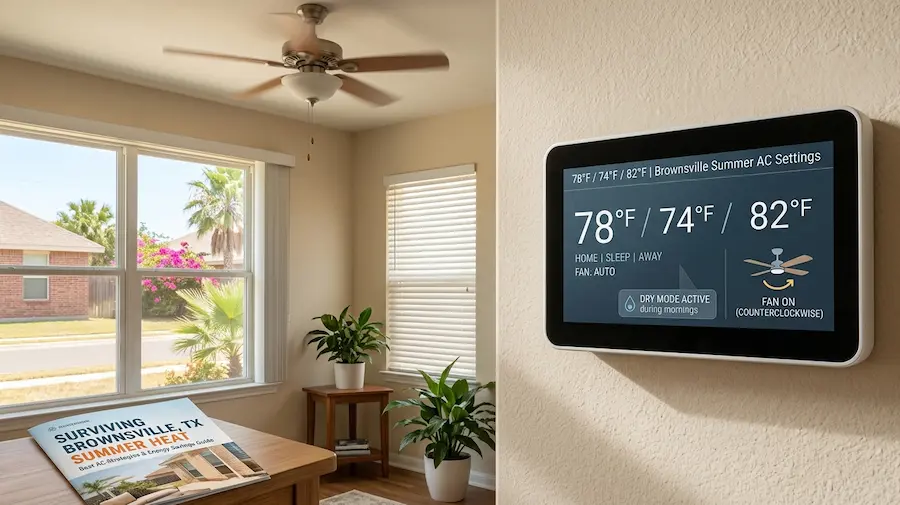
For Brownsville, TX summers, set your thermostat to 76°F to 78°F when you are home, raise it to 82°F to 85°F when you are away, and drop it to 74°F to 76°F at night for sleep. Always keep your fan on “Auto” mode and use the “Cool” or “Dry” mode during peak humidity hours. These settings balance comfort and energy savings in Brownsville’s notoriously hot and humid subtropical climate.
Why Brownsville, TX, Demands a Different AC Strategy
Brownsville’s summer heat is defined by both high temperatures and intense humidity. Located at Texas’s southernmost tip near the Gulf Coast, the city’s proximity to water increases humidity rather than providing relief.
Brownsville has a humid subtropical (Köppen Cfa) climate. Summers last from June to September, with temperatures often exceeding 93°F. August is the hottest month, averaging highs of 93.2°F and humidity near 80%. In July, temperatures range from 79°F to 92°F, and nighttime lows rarely fall below 80°F.

The heat index, which combines temperature and humidity, makes Brownsville summers feel much hotter than the air temperature alone. Direct sunlight can raise the perceived temperature by up to 15°F, creating a challenging environment with 10 to 11 hours of sun each day during peak months.
Generic thermostat advice does not apply in Brownsville. Strategies effective in Dallas or Houston must be adjusted for the more extreme and prolonged conditions of the Rio Grande Valley.
The Ideal Thermostat Settings for Brownsville, TX Summers
When You Are Home During the Day
The U.S. Department of Energy and ENERGY STAR recommend 78°F as a baseline summer setting. However, in Brownsville, high humidity and solar gain can make 78°F feel less comfortable than in drier regions.
For Brownsville homeowners, setting the thermostat to 76°F-78°F while at home and awake balances comfort and system efficiency. Homes with older insulation may require 76°F, while newer, well-insulated homes can maintain comfort at 78°F.
One important thing to keep in mind: your AC unit can typically cool your indoor space about 20°F below the outdoor temperature. So when Brownsville hits 95°F outside, and you expect to maintain 72°F indoors, most AC units can cool indoor air by about 20°F below the outdoor temperature. Attempting to maintain 72°F indoors when it is 95°F outside strains your system. Targeting 76°F to 78°F is more efficient and helps prevent equipment breakdowns during peak demand. The setback strategy prevents your HVAC system from cooling an unoccupied space to human comfort levels, while still keeping temperatures manageable so your unit does not have to work overtime when you return.
Do not turn the system off completely when leaving. In Brownsville, homes heat up quickly, and cooling a hot interior back to comfort often uses more energy than maintaining a setback temperature.
A programmable thermostat or a smart thermostat is the cleanest way to automate this. You can set it to begin cooling the home roughly 30 minutes before your expected return, so you walk into a comfortable space without having wasted cooling energy. A programmable or smart thermostat automates temperature adjustments. Set it to begin cooling about 30 minutes before you return, ensuring comfort without unnecessary energy use and keeping your energy bill in check.
Research consistently shows that optimal sleep occurs between 68°F and 72°F. In Brownsville, setting the thermostat to 74°F to 76°F at night with a ceiling fan running counterclockwise provides similar comfort while saving energy. The fan can make a 76°F room feel as cool as 72°F. Use it. This feature gradually adjusts the temperature and fan speed to match your body’s natural overnight cooling needs, reducing energy consumption without disrupting your rest.
Fan Setting: Auto vs. In Brownsville’s Humid Climate
Fan settings are often overlooked, but in Brownsville, managing humidity is as important as controlling temperature.
Set your fan to “Auto” instead of “On” to optimise performance in Brownsville’s climate.
With the fan on “Auto,” it runs only during cooling cycles, allowing evaporator coils to collect and drain moisture. This helps your system actively dehumidify your home.
When the fan is set to “On,” it continues to blow even when the cooling cycle is idle. This recirculates the moisture that collected on the coils back into your living space before it has a chance to drain. In a city where summer humidity is high, when set to “On,” the fan runs continuously, recirculating moisture back into your home before it can drain. This increases indoor humidity, reduces comfort, and forces your system to work harder, raising energy costs. When to Use Each.
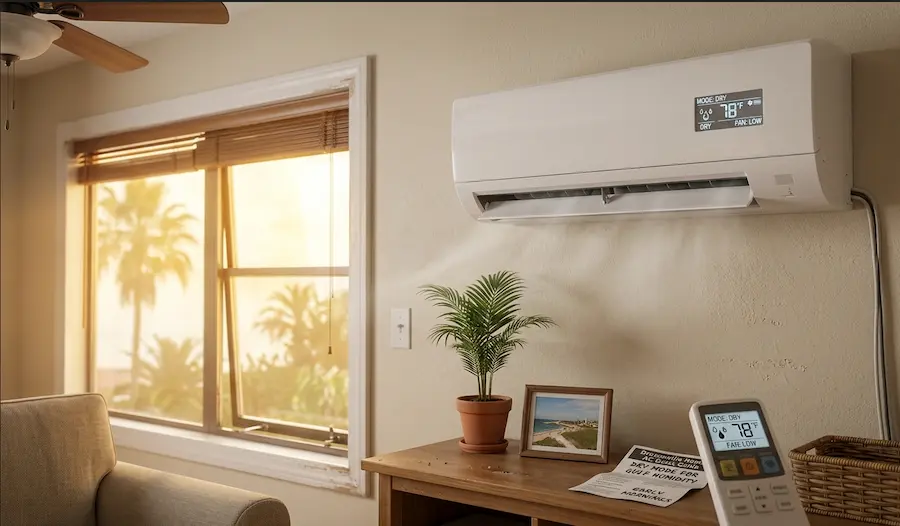
Modern HVAC and mini-split systems offer multiple modes. Selecting the appropriate mode for Brownsville’s conditions improves comfort and efficiency.
Use Cool Mode as the primary setting during most of the summer. It cools the air to your target temperature and is best during peak heat from late morning to early evening.
Dry Mode is particularly valuable in Brownsville. This mode prioritises removing moisture from the air. Dry Mode is useful in Brownsville, as it removes moisture without significantly lowering the temperature. Use it in the early morning or during May and October when humidity is high, but temperatures are moderate. rather than running at full capacity constantly. This is a solid choice during the milder parts of a Brownsville summer day when temperatures are trending down, such as in the hour after sunset.
Do not use Fan Only mode during peak heat. It circulates air without cooling or dehumidifying, offering little relief when temperatures are in the 90s.
Smart Thermostat Benefits for Brownsville Homeowners
Upgrading to a smart thermostat is a valuable investment for summer comfort in South Texas. Devices such as Nest, Ecobee, or Honeywell Home T9 automate temperature adjustments, eliminating the need for manual changes.
Smart thermostats learn your schedule, allow remote adjustments via smartphone, and some use geofencing to pre-cool your home before you arrive. They also provide detailed energy usage reports to help manage costs.
For those in demand response programs, smart thermostats can automatically raise temperatures during peak periods, often earning bill credits.
Supporting Strategies That Make Your AC Settings Work Harder
Proper thermostat settings are most effective when combined with supporting habits and home improvements. Reducing heat entering your home lessens the workload on your HVAC system during Brownsville’s long summer.
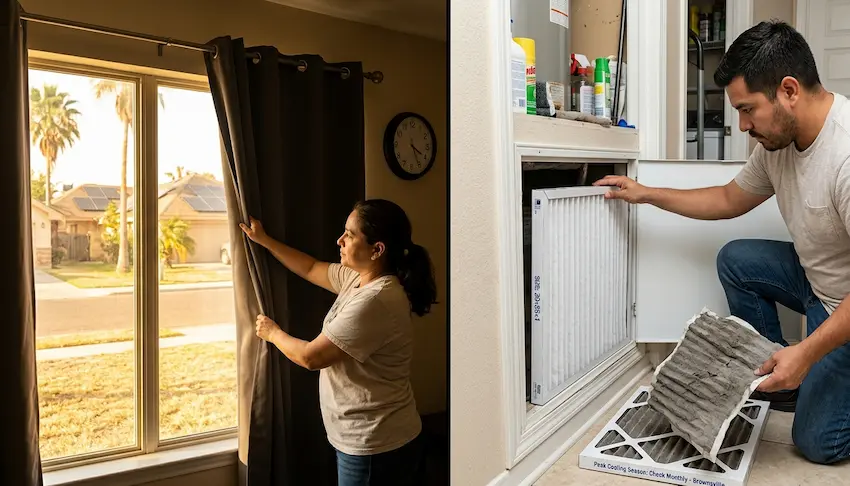
Use window coverings strategically. Brownsville receives up to 10 to 11 hours of direct sunshine on summer days. Solar heat gain through windows is one of the primary reasons indoor temperatures climb faster than expected. Use window coverings to reduce solar heat gain. Close blinds, curtains, or thermal drapes on south and west-facing windows between 11 AM and 5 PM. Blackout curtains are especially effective.In the peak cooling season in Brownsville, a monthly filter check is not excessive; it is standard practice.
Seal leaks around doors, windows, and ductwork. Hot, huSeal leaks around doors, windows, and ductwork. Weather stripping, caulk, and duct sealing are cost-effective ways to prevent hot, humid air from entering and conditioned air from escaping. Brownsville HVAC companies like Texas Air Conditioning, Texas Lone Star AC and Heating, and Colair Cooling and Heating offer pre-season maintenance visits that check refrigerant levels, clean evaporator and condenser coils, inspect electrical connections, and ensure your system is prepared to run efficiently through the long summer. A well-maintained system not only performs better but also lasts longer under South Texas operating conditions.
Use ceiling fans to increase comfort at higher thermostat settings. Running fans counterclockwise in summer allows you to raise the thermostat by two degrees, reducing cooling costs by about 6%. In Brownsville, the humidity challenge is significant enough that some homeowners install dedicated dehumidifiers alongside their central AC systems. A standalone dehumidifier handles moisture removal independently, allowing the AC to focus on temperature, and together they create a more comfortable indoor environment without the AC needing to run as hard or as long.
Common AC Mistakes Brownsville Residents Make in Summer
Knowing common mistakes is as important as following recommended settings.
Setting the thermostat too low, thinking it cools faster. Your AC unit cools at a constant rate regardless of how low you set the thermostat. Setting the thermostat too low does not cool your home faster. The AC cools at a constant rate, so lower settings only increase run time, energy use, and system strain. to 95°F or above indoors while you are at work requires far more energy and recovery time than a home maintained at 82°F to 84°F during your absence.
Do not ignore humidity when adjusting settings. A home at 76°F with 70% humidity feels less comfortable than one at 78°F with 50% humidity. Use Dry Mode, Auto fan, and consider a dehumidifier to manage humidity.
Skipping annual maintenance. An AC system running in Brownsville accumulates thousands of operating hours over the summer. Low refrigerant, dirty coils, and clogged drain lines all reduce efficiency and can lead to complete system failure during the hottest weeks of August. Do not skip annual maintenance. Extended summer use can cause low refrigerant, dirty coils, and clogged drains, reducing efficiency and risking system failure during peak heat.”
“While keeping your AC in top shape is essential, don’t overlook your other home appliances during the demanding summer months. If you’re dealing with issues beyond HVAC like a refrigerator or washer working overtime in the heat. a trusted appliance repair service such as Appliance Repair in Philadelphia, PA can help keep the rest of your home running smoothly.”
The settings outlined in this guide, targetinFollowing these settings—76°F to 78°F when home, 82°F to 85°F when away, and 74°F to 76°F for sleep—along with Auto fan mode, Dry Mode, ceiling fans, and regular maintenance, provides an effective, evidence-based strategy for managing Brownsville’s summer heat and controlling energy costs.r a four-month cooling season. Every degree you raise the thermostat above your current setting saves approximately 3% on cooling costs for that period. Every filter change, sealed gap, and closed blind reduces the load on a system that is already working at capacity. And a professional tune-up before June ensures that none of those savings disappears to an untimely breakdown in August.
If you are unsure about your system’s sizing, calibration, or maintenance, consult a local HVAC professional. Proper settings are only effective if your equipment is in good condition.